Apex Legends Codes 2026: All Active & Working Codes

In 2026, Apex Legends codes are usually tied to specific promos, so knowing what kind of code it is—and where it’s meant to be redeemed—matters as much as the code itself. The catch is that “working codes” don’t behave like a simple monthly drop that everyone can redeem the same way.
This guide will walk you through where Apex Legends codes come from, where to enter redeem codes on each platform, and what to do when a code won’t work.
- 1. All Active Apex Legends Codes
- 2. Expired Apex Legends Codes
- 3. How to Redeem Apex Legends Codes
- PC (EA account codes)
- PlayStation (PS5/PS4 vouchers)
- Xbox (Series X|S / One)
- Nintendo Switch (Nintendo eShop)
- 4. Apex Legends Codes Not Working
- 5. Where to Find New Apex Legends Codes in 2026
- 6. Types of Rewards From Apex Legends Codes
- 7. FAQs
All Active Apex Legends Codes
As of February 2026, there aren’t any active Apex Legends codes that players can redeem universally (the kind where everyone can enter the same string and get rewards).
When Apex redeem codes do show up, they’re usually limited-time and often unique to a specific promotion or platform voucher, so whether a code works depends on where it came from, the account it’s redeemed on, and (for vouchers) the store/region rules.
Here’s a quick reference that covers the code types players see most often:
| What the code looks like | What it usually is | Where it redeems |
|---|---|---|
| EA product-style key (varies) | EA product or promo code | EA’s official redemption flow (web) or the EA app |
| 12-digit voucher | PlayStation Store voucher | PlayStation Store “Redeem Codes” |
| 25-character key | Xbox/Microsoft code | Xbox/Microsoft redemption flow |
| 16-character download code | Nintendo eShop code | Nintendo eShop redemption |
Note: If a code doesn’t match one of these patterns, it may be a checkout promo (discount) or a non-redeemable label being described as a “code.” Those won’t unlock in-game rewards through normal redemption.
Expired Apex Legends Codes
Codes in Apex Legends do not last forever. Many distribution campaigns leave codes active for several months, while others expire within weeks. Below is a list of recently expired codes. If you see these circulating online, they will likely no longer provide rewards.
Here is a list of expired Apex Legends codes:
- 2N5W-F7NN-V65W-WVGF: Rewards 50 Apex Coins
- CVFD-NSUX-CDAW-H8G9: Rewards 600 Apex Coins
- C4ME-EXHK-BVMG-T78L: Rewards 500 Apex Coins
- DCZA-SA3X-MVML-HRLB: Rewards 100 Apex Coins
- C4FP-SUXH-BPCY-LCNZ: Rewards a Free Skin
- 996C-JD7U-G9QC-GWX8: Rewards a 2-hour Level Boost
How to Redeem Apex Legends Codes
Redeeming Apex Legends codes can look a little different on each platform, so it helps to follow the correct steps for PC, PlayStation, Xbox, or Nintendo Switch to make sure the reward lands on the right account.
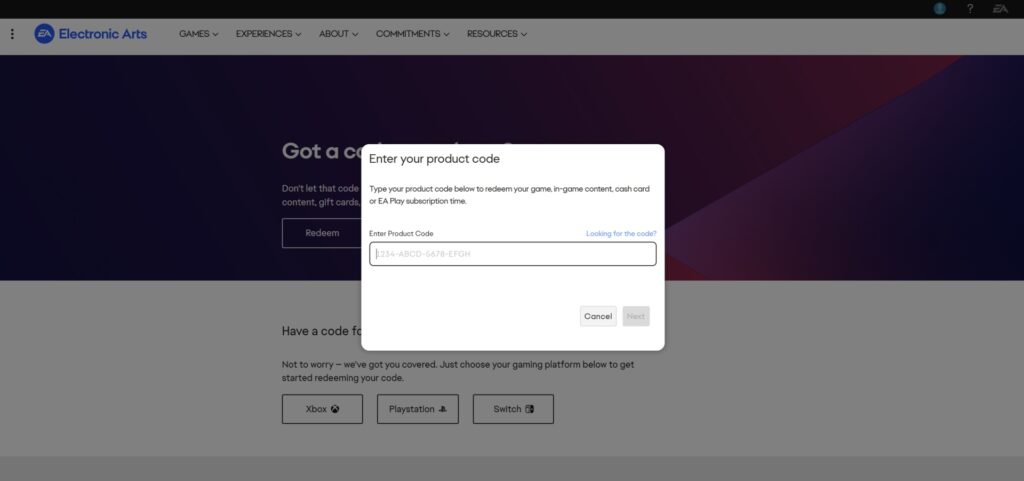
PC (EA account codes)
If the Apex code is meant for EA redemption:
- Sign in to EA’s official code redemption page (the “Redeem” section on EA’s site).
- Enter the code exactly as shown and confirm.
- Launch Apex on the platform linked to that EA Account and check the unlocked content.
PlayStation (PS5/PS4 vouchers)
PlayStation voucher codes are 12-digit and redeemed in the PlayStation Store via the “Redeem Codes” option. One common reason vouchers fail is region mismatch. If the voucher region doesn’t match the account’s store region, redemption can be blocked even when the code is typed perfectly.
Xbox (Series X|S / One)
Xbox codes are usually 25 characters in five blocks. Redeem them through Xbox’s official redemption flow, then follow the prompts. Before confirming, it helps to double-check the signed-in Microsoft account. If the wrong profile is active, content can be routed to the wrong account.
Nintendo Switch (Nintendo eShop)
Nintendo eShop download codes are typically 16 characters. Redeem them in the eShop and confirm. A nice built-in clue: the on-screen keyboard may disable characters that aren’t used in prepaid/download codes. If the code includes characters that can’t be entered, it’s a sign that something is off.
Apex Legends Codes Not Working
When your Apex Legends code isn’t working, the issue usually comes down to a small set of recurring causes. The exact wording of the error matters, so it helps to diagnose first, then retry.
Here’s a quick troubleshooting table to help if your Apex code fails:
| What you see | What it usually means | What to do next |
|---|---|---|
| “Invalid” / rejected immediately | Wrong code type, typo, or expired | Re-type carefully, remove spaces, and redeem it in the correct system for that code type |
| “Already redeemed” | The code was used before (many are single-use) | Confirm the correct account is signed in; if it was acquired secondhand, it may already be claimed |
| Redeemed, but reward missing | Account mismatch or a sync delay | Confirm the EA Account and platform account match; restart and re-check inventory/entitlements |
| Region-related failure (common on vouchers) | Voucher doesn’t match account store region | Verify region rules for the platform account being used |
Where to Find New Apex Legends Codes in 2026
If your goal is to find Apex Legends codes, the reliable path in 2026 is focusing on legitimate distribution channels:
- Official promotions tied to Apex
- Partner campaigns with clear terms (platform, region, validity window)
- Retail bundles and platform storefront offers that deliver a redeemable code
- Event-linked rewards where redemption happens through platform/account systems
Types of Rewards From Apex Legends Codes
While many players hope for Apex Coins, redeem codes (when available) usually offer a mix of rewards depending on the promotion—most commonly cosmetics or limited-time entitlements.
Beyond currency, Apex Legends codes can also unlock:
- Weapon Skins: Cosmetic changes for your loadout.
- Level Boosts: Such as the 2-hour boost available in February.
- Exclusive Items: Including banners and charms.

FAQs
Do Apex Legends codes expire?
Yes. Many codes are time-limited or tied to a promotional window. Redeeming sooner is always safer than waiting.
Can the same code be used multiple times?
Usually not. Most codes are single-use and become invalid once claimed on an account.
How do I redeem Apex Legends codes on console?
Console redemption usually takes place within the platform store process: PlayStation “Redeem Codes,” Xbox redemption, or Nintendo eShop redemption. The important point is matching the code type with the respective platform.
How do I get free Apex Coins?
There’s no guaranteed way in 2026, but Apex Coins can occasionally come from limited-time promotions or specific bundles—otherwise, the free Battle Pass track is the most consistent way to earn rewards without buying coins.
Why are my Apex Legends codes already redeemed?
Common causes include single-use codes previously claimed, account mismatches, or secondhand codes previously redeemed. Double-check the signed-in platform account and the EA Account tied to the Apex profile.