How To Zoom Out in League of Legends
This article will show you how to zoom out of League of Legends. Although it is one of the easiest adjustments in the game, many still do not know you can zoom in and out of your champion in League of Legends.
Having your camera in the wrong setting could completely change the outcome of a game. Perhaps you are too zoomed in? or too far out and struggling to see your champion in team fights. Don’t you worry..
How To Zoom Camera Out League of Legends
Zooming in League of Legends could not be simpler. But first, you may want to tweak a couple of settings before playing. The first is the camera move speed. This will apply later in the article as we should show you how to use the Camera Lock feature. But for now, you can adjust these settings to save you from doing it later. Do the following to change the camera speed:
- While in-game, press the Esc button to access the settings menu.
- Click on the Game tab, which is at the bottom of the navigation bar on the left.
- Adjust the camera move speed on the slide bar.
- Press Okay and then exit the menu.
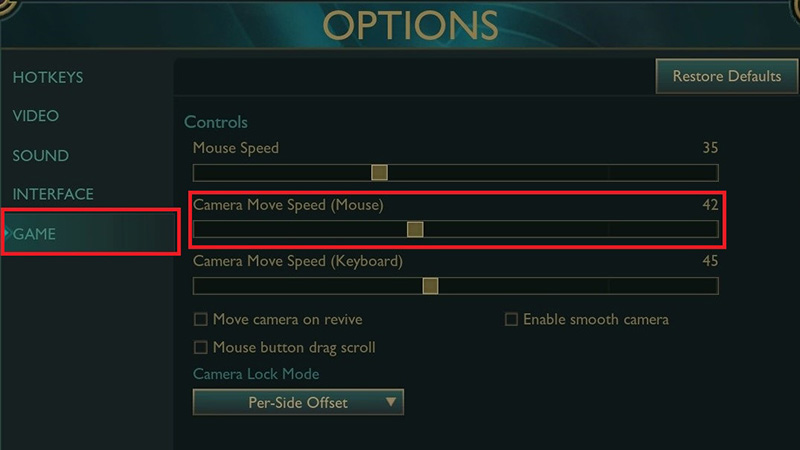
Image Credit: Riot Games
Now that we have these settings adjusted, we can focus on the primary task: zooming. Roll the scroll upwards to zoom in, backwards to zoom out. This will adjust how close or far away your champion’s point of view will be.
Using Camera Lock Mode in League of Legends
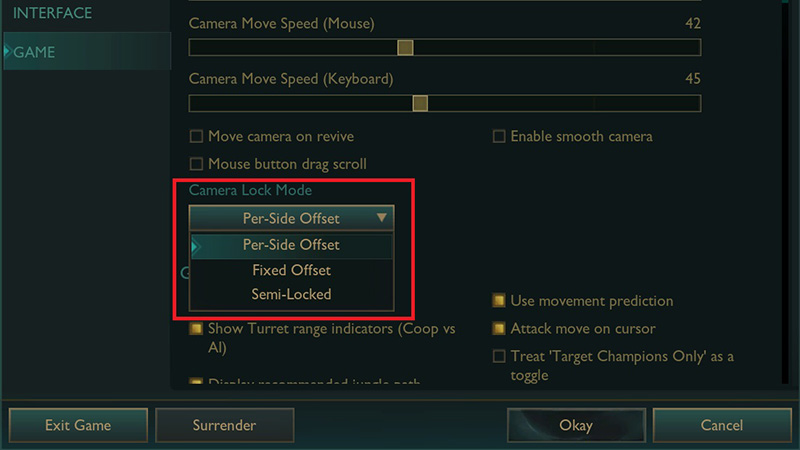
Image Credit: Riot Games
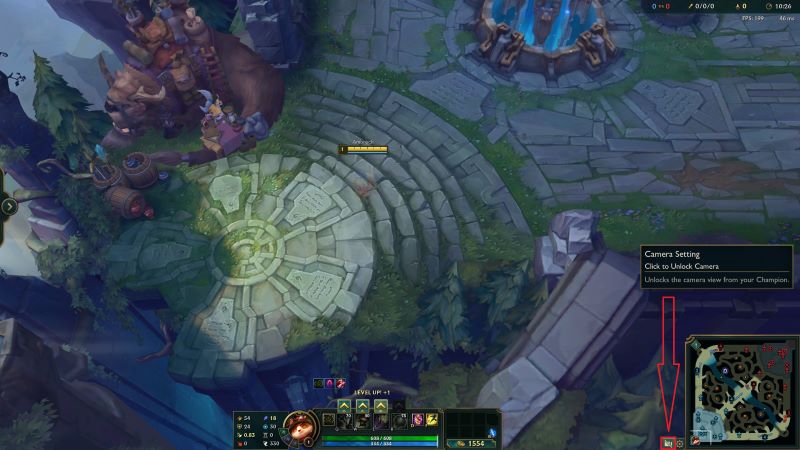
Image Credit: Riot Games
Read next: LoL Pros Settings guide – Equipment, DPI, and much more