MLBB 120 FPS Supported Devices List (2026): Ultra Frame Rate Guide

Playing Mobile Legends: Bang Bang at 120 FPS feels noticeably cleaner in fights, especially on fast heroes and tight skill-shot windows. But the confusing part is that a 120Hz display alone doesn’t guarantee the Ultra option will appear.
In this guide, you’ll find the latest MLBB 120 FPS supported devices list for 2026. It also covers system requirements, how to enable Ultra Frame Rate, and what to do if the 120 FPS option doesn’t appear.

What Does 120 FPS Mean in MLBB?
In MLBB, 120 FPS means the game is drawing up to 120 frames per second, which can match a 120Hz (or higher) display. That usually translates into smoother camera movement, cleaner animation timing, and more consistent visual feedback in chaotic teamfights.
It also helps reduce the “muddy” feel some players notice at 60 FPS when tracking targets, aiming skill shots, or making quick micro-adjustments.
MLBB 120 FPS Requirements in 2026
There isn’t a single publicly available, always-updated spec sheet from Moonton that guarantees 120 FPS on every capable phone. In practice, Ultra Frame Rate in Mobile Legends is device-dependent and can vary by update or region.
A realistic MLBB 120 FPS requirements checklist looks like this:
- High-refresh display (120Hz/144Hz/165Hz)
- Power mode set to performance (battery saver can hide or limit high FPS)
- RAM: At least 8GB is standard for devices with these frame rates to prevent background task interference.
- Thermals: Effective cooling is essential for sustained performance. Overheating phones throttle, dropping frames regardless of maximum capacity.
- The game client is actually showing the “Ultra” option in Graphics/Frame Rate
MLBB 120 FPS Supported Devices List (2026)
The following table lists all MLBB 120 FPS supported devices for 2026. These smartphones feature 120 Hz, 144 Hz, or 165 Hz panels and are optimized to run in Ultra refresh rate mode.
| Manufacturer | Supported Device Models |
|---|---|
| Samsung | Galaxy S23, Galaxy S23+, Galaxy S23 Ultra; Galaxy Z Fold 5; Galaxy Z Flip 5; Galaxy S25, Galaxy S25+, Galaxy S25 Ultra; Galaxy S25 Edge; Galaxy Z Fold7; Galaxy Z Flip7 |
| Apple | iPhone 13 Pro, iPhone 13 Pro Max; iPhone 14 Pro, iPhone 14 Pro Max; iPhone 15 Pro, iPhone 15 Pro Max; iPhone 16 Pro, iPhone 16 Pro Max; iPhone 17; iPhone 17 Pro; iPhone 17 Pro Max |
| ASUS | ROG Phone 8 Ultimate; ROG Phone 9 |
| Xiaomi | Xiaomi 13; Xiaomi 14; Xiaomi 14 Pro; Xiaomi 15; Xiaomi 15 Ultra; Xiaomi 15T Pro; Poco X7 Pro; Redmi Note 14 Pro 5G; Redmi Note 14 Pro+ 5G; Redmi Note 15 Pro; Redmi Note 15 Pro 5G |
| OnePlus | OnePlus 11; OnePlus 12; OnePlus 13; OnePlus 13R |
| Nubia | Nubia Z50; Nubia Z60 Ultra |
| RedMagic | RedMagic 9; RedMagic 10 Pro; RedMagic 10S Pro |
| Pixel 8 Pro; Pixel 10 Pro; Pixel 10 Pro XL | |
| realme | realme 12 Pro+; realme GT 7 Pro; realme GT 7; realme GT 7T |
| OPPO | OPPO Find X6 Pro; OPPO Find X8 Pro |
| vivo | vivo X100 Pro+; vivo X200 Pro |
| Motorola | Motorola Edge 40 Pro; Motorola Edge 50 Pro |
| Tecno | Tecno Camon 30 Premier; Tecno Camon 40 Premier 5G |
Note: Some upper mid-range devices, specifically from Poco and Redmi, may require you to enable a performance profile or clear game data before the Ultra 120 FPS option appears in settings.
How To Check If Your Device Supports 120 FPS In MLBB
If you own a device with a high-refresh-rate display but are unsure whether MLBB supports it, you can verify its availability directly in the game client. Follow these steps to check for support:
- Update the Game: Ensure you are running the latest version of MLBB from your app store
- Access Settings: Tap the gear icon in the top right corner of the main lobby
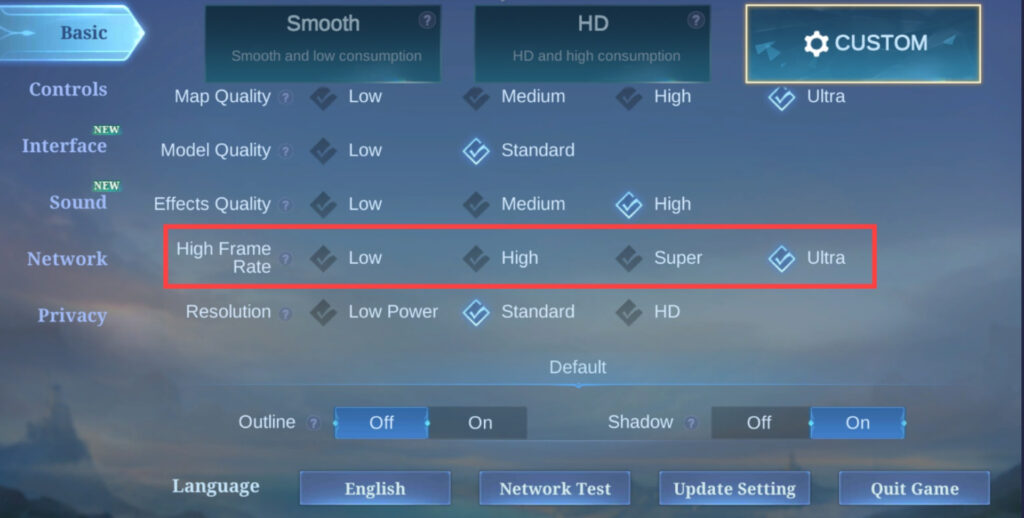
- Navigate to Graphics: Open the “Basics” tab, where graphics options are located
- Check Refresh Rate: Look for the “High Frame Rate” slider. If “Ultra” is available and selectable, your device supports 120 FPS
Best Settings For Stable 120 FPS In MLBB
Enabling 120 FPS is only half the battle. Maintaining that frame rate during intense team fights requires optimized settings. Fluctuations (frame drops) are worse for gameplay than a steady lower frame rate.
- Graphics: Set to “Smooth” or “Balanced”. While flagships can run “Ultra” graphics and “Ultra” refresh rate simultaneously, lower graphics ensure frame times remain consistent during heavy skill casting.
- High Frame Rate: Set to “Ultra” (120 FPS).
- Visual Effects: Disable unnecessary options such as Shadows or Outline if you experience stutter.
- Game Turbo/Game Mode: Always launch MLBB through your phone’s native game booster to prioritize CPU/GPU resources.
Why Can’t I Enable 120 FPS in Mobile Legends?
If you’re having trouble enabling 120 FPS in Mobile Legends, try checking a few things:
- Phone has 120Hz, but MLBB hasn’t enabled Ultra for that exact model/variant yet
- Phone is stuck on 60Hz due to a system setting or battery saver
- Device is overheating, so the system is throttling refresh/performance
- Ultra Frame Rate is present, but the game won’t apply it until a restart after changes
If the device is capable, the safest “fix path” is: update game → set display to 120Hz → disable battery saver → restart phone → re-check Graphics.
FAQs
How do I know if my phone supports 120 FPS in MLBB?
You can verify support by checking the Graphics settings in the game. If the “Ultra” option is visible and selectable under the Refresh Rate section, your device natively supports 120 FPS.
Does 120 FPS drain the battery faster?
Yes, rendering twice as many frames per second significantly increases power consumption and heat generation. It is recommended to charge your device to a sufficient level or use bypass charging if your device supports it.
Do iPhone Pro models support 120 FPS in MLBB?
Yes, iPhone Pro models from the 13th generation onward feature ProMotion displays (10-120Hz), which MLBB uses to deliver a solid 120 FPS experience in Ultra mode.
Do you need a 120Hz display to achieve 120 FPS in MLBB?
Yes, a 120Hz (or higher) display is required to show 120 frames per second. A 60Hz panel can’t display 120 FPS, even if the device is powerful.